 pawlooks
How to find and organize your dog and cat photos on your phone
Updated
The least work is a pet photo gallery app that finds your pet's photos for you and sorts them by pet. Gallery search is quick but only shows results by date, and a hand-made album is exact but needs every new photo added by hand.
Why pet photos get lost
Your camera roll stacks every photo by the date it was taken, so your pet ends up mixed in with receipts, screenshots, and documents. Even when a big share of the roll is your pet, finding a photo from a few years ago means a lot of scrolling.
1. Search your phone gallery
Most phone galleries let you search for 'dog' or 'cat'. It's the fastest way to find a few photos right now.
- Good: nothing to install.
- Not great: results come by date only, and often can't tell your dog from other dogs.
- Not great: with more than one pet, photos aren't split by pet.
2. Make an album by hand
Create an album in your gallery and add your pet photos yourself. Only the photos you pick go in, so it is the most exact.
- Good: exactly the photos you want.
- Not great: every new photo has to be added by hand, so it tends to stall after a few months.
- Not great: it doesn't tell you how old your pet was in each photo.
3. Use a pet photo gallery app
A pet photo gallery app looks through your camera roll, finds dog and cat photos, and groups them by pet. pawlooks does this on the phone and binds the photos by your pet's age (2 months, 1 year, 2 years…) instead of by date.
- Open the app and allow photo access. If you allow only some photos, it looks in those.
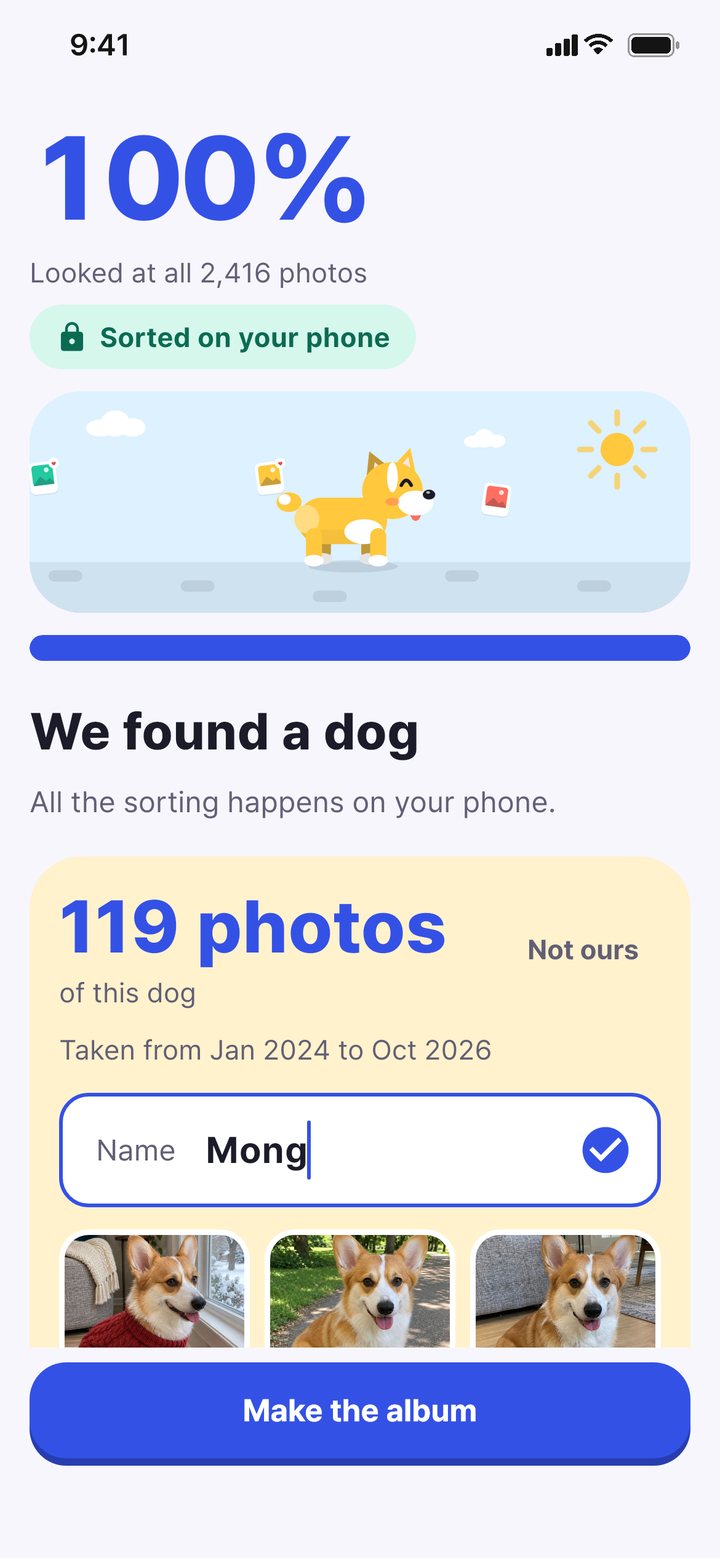
- The app looks through your camera roll on the phone and sorts dog and cat photos by pet.
- Add your pet’s name and birthday (a rough one is fine) to get an album by age.
- Fix one photo in the wrong place and similar ones are fixed too.
The three ways side by side
| Gallery search | Album by hand | Pet gallery app (pawlooks) | |
|---|---|---|---|
| Effort | Every search | Every photo | Once |
| Split by pet | Hard | By hand | Automatic |
| View by age | No | No | Yes |
| New photos | Search again | Add by hand | Sorted when you open the app |
| Photos sent to a server | Depends on the gallery | No | No (on the phone only) |
Good to know before you start
- Check whether an organizer moves or deletes your originals. pawlooks leaves your library as it is and only gathers photos inside the app.
- Photos stored only in the cloud and not on the phone may not be visible to an app right away. pawlooks doesn't download them to analyze them.
- Screenshots are usually not pet photos, so pawlooks leaves them out by default (you can change this in settings).
How it looks in pawlooks
FAQ
Do pet photo organizer apps upload my photos?
It depends on the app. pawlooks finds and sorts your pet only on the phone and doesn't send photos to a server to analyze them.
Does it work for cats too?
Yes. pawlooks finds both dogs and cats and gives each pet their own albums.
Will organizing change the photos in my library?
No. pawlooks doesn't move or change your originals, and photos you delete in the app can be restored from its trash for 30 days.